
Other Pedal
Cusack Music Tap-A-Scream Pedal
- SKU:
- CMTS-M
- Weight:
- 1.00 LBS
- Shipping:
- Calculated at Checkout

Description
Cusack Music Tap-A-Scream Pedal
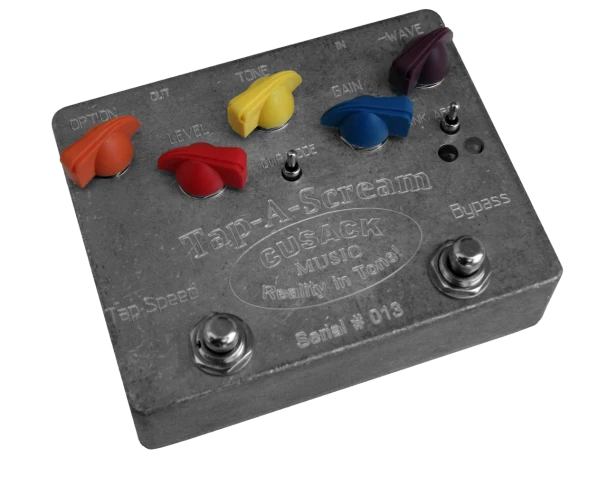
is a unique, discontinued tap-tempo modulated overdrive pedal that blends a classic Tube Screamer-style overdrive circuit with rhythmic gain modulation. Unlike a traditional tremolo that modulates your total output volume, this pedal rhythmically modulates the amount of distortion while keeping your underlying clean signal intact.
Option Knob – Function depends on what else is going on. Read each
description to see how to access each function:
Tap Divide - Controls how your tap will be divided. Positions are from
counter clockwise, 1/4, 1/3, 1/2, 1, 2, 3, 4, 6 The Option Knob will adjust Tap
Divide whenever the pedal is engaged, and you are NOT holding the Tap
Switch down.
Fade-In - All the way down the pedal turns on right away, all the way up is
about 4 seconds. The Option Knob adjusts Fade-In while in Bypass.
Brake Speed - Controls how fast the tempo will change when you hold the
Tap switch. All the way counter clockwise is the slowest. The Option Knob
adjusts this setting whenever the Tap Switch is being held down for more
than ½ second (you are using the Brake Function).
Level - Controls the output level of the Left output. Adjust this to make
the bypassed level, and effected level the same.
Tone - Controls the overall Tone of the Overdrive Signal.
Gain - Controls the maximum gain of the Overdrive, which is modulated
by the Tap Tempo waveform. The minimum gain is dependant on the
waveform.
Wave - Selects one of 8 waveforms in the current bank. With 3 banks,
there are a total of 24 waveforms .
Bank Switch - Selects between banks A, B, and C.
See waveform images on the next page
to see which waveforms
are in each bank.
Clip Mode Toggle - Select
the type of Clipping Diodes.
To the Left is “Stock”, to the
right is “Crushed”, and in the
middle is “LED” (Asymmetrical LED
clipping). Different diodes cause
the overall level to change, so you
may have to adjust the level after
moving the Clip Mode Toggle.
Mode Jumper (Internal) - Preset and
Live. In Preset mode changing the waveform will load the saved parameters for
that waveform. In Live mode, all current
settings will apply to ALL waveforms. While in
Preset Mode, any changes made are temporary. They will revert back to the saved settings if you change the waveform.
Tap Speed - Tap twice to set the tempo. It’s also a modified "brake"
control. If you hold it down, the Tempo slows down. If you let go and hold
it again it will speed up. Every time you hold and release, it changes
direction. Wherever you let go, it will stay at that tempo. It defaults to
Slowing Down whenever you Engage the effect.
Bypass - Kick the switch to change from Bypass to Engaged.
IN - This is the input to the pedal. This jack dis-connects power, so unplug
when not in use.
OUT- The Output jack is a Stereo output. The Right output is a modified
inversion of the left channel. Make sure to set the jumper to Stereo for
correct operation in bypass. While in Mono, the Right output is active
while the pedal is on, but muted while the pedal is off. In Stereo mode, both
outputs are True Bypassed.
DC Power Jack - This has the same pin-out as most standard pedal supplies: tip is ground, sleeve 9V.
Dimensions: 4.7" x 3.69" x 1.37"
Weight:1.00 lb
Related Products
Related Products
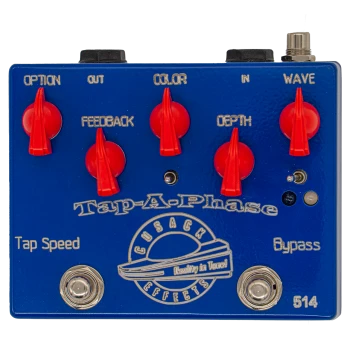
Cusack Music Tap-A-Phase Analog Tap-Tempo Phaser Blue
Other Pedal
- SKU:
- CMTP-B
- Weight:
- 0.75 LBS

Cusack Effects Tap-A- Whirl Tremolo Pedal with:" Option, Lvl, Rate, Depth, Wave, ByPass, Tap Speed, Live Preset, and Bank ABC".
Other Pedal
- SKU:
- OPCE-R
- Weight:
- 1.00 LBS

Nord Sustain Pedal
Nord
- SKU:
- NORD-40265-Sustain Pedal
- Availability:
- In Stock, Fixed Freight includes: Insurance, Warranty and Delivery
- Weight:
- 1.00 LBS

WOBO Guitar Electronics Buffer/Booster
Other Pedal
- SKU:
- OPWGEB-R
- Weight:
- 0.55 LBS

Zvex Effects- Vexter Series Super Hard On Preamp Pedal
Other Pedal
- SKU:
- OPZEVSH-M
- Weight:
- 0.50 LBS